
First, separate the blockchain transfer from the account credit
Seeing a successful transaction in a block explorer is reassuring, but it does not prove that an exchange has credited the deposit to your account. There are two different systems involved. The blockchain records a transfer to an address on a particular network. The exchange then identifies that transfer, checks its own deposit rules and updates the customer’s balance. A delay can occur in the first stage, the second stage, or because the transfer details do not match the deposit instructions.
Before doing anything else, do not send the same amount again. A second transfer will not make the first one appear, and it can create another missing-deposit case. Keep the withdrawal receipt open, copy the transaction hash, and work through the checks below in order. If the transaction is still pending, contact the platform that sent it. If it is confirmed and the destination is controlled by an exchange, the receiving exchange is usually the party that can explain its crediting status.
Step 1: Find the transaction hash and choose the correct explorer
Open the withdrawal details on the sending wallet or exchange and look for a field named Transaction ID, TxID, transaction hash or hash. Some interfaces show a button such as “View on explorer.” Use it if it opens the explorer for the network you actually selected. Otherwise, independently open a reputable explorer for that network and paste in the hash. A Bitcoin transaction hash cannot be looked up on an Ethereum explorer, and an Ethereum transaction hash cannot be verified on Tron or Solana.
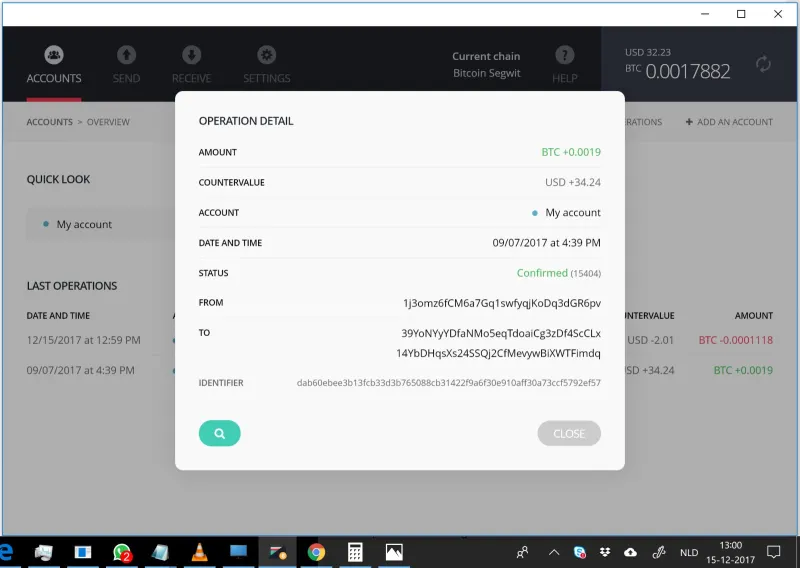
Check that the explorer result matches the asset, approximate amount, sending time and destination shown on your withdrawal receipt. Copy the destination address from the explorer and compare its beginning and ending characters with the deposit address you copied from the receiving platform. Do not rely on a search result or a screenshot sent by another person. If the sender’s app says “completed” but the explorer cannot find the hash, ask the sending service whether it has broadcast the transaction or supplied an internal reference instead of an on-chain hash.
Step 2: Read the status, not just the word “completed”
An explorer may show a transaction as pending, confirmed, successful, failed or reverted. The exact labels depend on the chain. “Pending” usually means that the transaction has not yet been included in a block or has not reached the explorer’s required confidence level. A successful EVM transaction means the operation executed without reverting, but an exchange may still wait for additional blocks before it credits the deposit. A failed transaction normally means the contract call did not complete; check whether the asset was actually transferred before drawing a conclusion.
For a Bitcoin transfer, the first confirmation means a miner included it in a block. Later blocks add confirmations. For account-based networks, the explorer may show a block number, transaction status and confirmation count, while the receiving service applies its own deposit threshold. There is no single confirmation number that applies to every asset or platform. Requirements can change, and exchanges sometimes pause deposits during maintenance, chain upgrades or unusual network conditions. Use the current deposit page and status notice rather than an old blog table.
Step 3: Confirm the exact network and token
A token ticker does not identify a unique blockchain. USDT, USDC and other assets can exist on several networks, and their addresses may look different or, on EVM-compatible chains, may share the same address format. Compare the withdrawal network with the network selected on the receiving platform. “Ethereum,” “ERC-20,” “TRON,” “TRC-20,” “BNB Smart Chain” and “Solana” are not interchangeable labels.
If the transaction is on a network the receiving exchange does not support for that asset, the balance may not be credited automatically. Whether recovery is possible depends on the platform, address control, token contract and its policies. Do not assume that matching-looking addresses mean that the funds are recoverable. Read the receiving exchange’s current unsupported-deposit guidance and contact support through the signed-in website or app. An outside recovery service cannot change the exchange’s internal deposit records.
Step 4: Check the address, memo and tag
Compare the full destination address, not only its first and last four characters. A copied address can be replaced by malware, and an address from an old deposit page may have expired or changed. If you see a mismatch, preserve the original withdrawal record and tell the receiving exchange exactly what appears on-chain. Do not publish your full account details in a public group.
Some networks and exchanges also require a memo, destination tag, payment ID or comment in addition to the address. This extra field helps a custodial service distinguish deposits sent to a shared wallet. If the asset’s deposit page showed a memo and it was missing or incorrect, the blockchain transfer can still succeed while the exchange cannot automatically associate it with your account. Follow the exchange’s formal recovery process. The exchange may charge a fee, require identity checks or state that recovery is unavailable; terms differ by platform and asset.
Step 5: Look for account-side requirements
If all on-chain details match, open the exchange’s deposit history and status page. A deposit may be listed as pending even when the explorer shows it confirmed because the exchange requires more confirmations. The account may also need identity verification, an additional source-of-funds declaration, a security review or completion of a deposit memo. Check notifications and email from the platform, but do not follow login links in unsolicited messages; type the official domain yourself or open the app.
Check the minimum deposit amount for the asset and network. Some services do not credit amounts below a published threshold, and the threshold can change. Also look for a maintenance notice or a temporary suspension of deposits. If the transaction is credited to the platform’s address but does not appear in the account, the blockchain cannot tell you whether an internal review is holding the credit. That requires the exchange’s records and support team.
When and how to contact support
Once the required confirmations have been reached and the destination, network and memo appear correct, open a ticket with the receiving platform. Include the asset and network, amount, transaction hash, deposit address, memo or tag if applicable, approximate send time, sending platform, and a screenshot of the withdrawal receipt with sensitive account information obscured. The hash is public on-chain data, but your password, two-factor code, recovery phrase and private key are never needed for a legitimate deposit investigation.
Ask a precise question: “The explorer shows this transaction as successful with [number] confirmations. Can you confirm whether this network and token are supported and whether the deposit is awaiting additional confirmations or review?” This gives support facts it can check instead of a vague claim that the crypto is lost. Keep the ticket number and follow up in the same verified channel. Do not open multiple duplicate tickets unless the exchange asks you to; duplicate requests can slow the investigation.
Warning signs of recovery scams
People often search social media for help when a deposit is missing. Scammers monitor those posts and pretend to be exchange staff, wallet developers or blockchain recovery specialists. They may ask for your seed phrase, remote access to your device, a “verification transfer,” a fee paid directly to a personal wallet, or a signature on an unknown website. None of these steps is required to look up a transaction hash.
A real exchange may have an official recovery tool or a published service fee, but it will be inside its own website or app and described in its help center. Confirm the domain independently. Never trust an unsolicited direct message, and never install software to let a stranger “sync” or “validate” your wallet. If you have already shared a recovery phrase, treat the wallet as compromised and move remaining assets to a new wallet created on a clean device, if safe to do so.
A quick checklist before you escalate
Have you selected the correct explorer for the sending network? Does the hash show a successful transfer, and are the amount and destination correct? Does the destination match the latest deposit page? Did you choose the same asset and network at both ends? Was a memo or destination tag required? Is the amount above the exchange’s minimum? Has the platform reached its current confirmation threshold, and is there a maintenance or account-review notice? These checks will narrow down whether the delay is on-chain, caused by a mismatch, or waiting on an exchange process.
If one answer is uncertain, do not guess and do not resend. Gather the transaction facts and ask the appropriate service: the sender for an unbroadcast or pending withdrawal, the receiving exchange for a confirmed deposit sent to its supported address, or the owner of a self-custody address if you sent to the wrong place. Blockchain transfers are generally irreversible, so reliable diagnosis matters more than fast promises.
A worked example: confirmed on-chain, pending at the exchange
Consider a Bitcoin withdrawal that appears in an explorer with several confirmations while the receiving exchange still shows no available balance. The explorer establishes that the transaction was included on the Bitcoin network and identifies the destination address. It does not establish how many confirmations the exchange requires, whether that deposit address was active for your account or whether the exchange has completed its internal checks. Comparing the transaction with the current deposit instructions is what narrows the cause.
If the details match, send support the transaction hash, asset, network, amount, destination and approximate time. Ask whether the deposit is waiting for its current confirmation threshold or for an account review. This is more useful than relying on a screenshot alone, because support can query the transaction directly and compare it with its own deposit records. Keep your password, authentication codes and recovery phrase out of the conversation.
Frequently asked questions
Why is my crypto deposit not showing after confirmations?
The exchange may require more confirmations than the explorer’s first confirmation, may be processing a maintenance or security review, or may not recognize a mismatched network, token, address or memo. Check the exchange deposit page and open an official support ticket with the transaction hash once the stated threshold has been reached.
Can a confirmed crypto transaction still be missing?
Yes. Confirmation proves that a transaction was included on the relevant blockchain; it does not prove that a custodial service credited a customer account. The deposit address, network, token contract, memo and internal exchange processing all matter.
Should I send the crypto again?
No. First confirm whether the original transaction succeeded and where it went. A duplicate transfer can create a second problem and may not be reversible.
Sources and further reading
Kraken Support: missing cryptocurrency deposits · Coinbase: pending crypto transactions · Crypto.com: missing crypto deposits · Ethereum.org: transactions


Comments
Loading comments…